Wordpress Plugin Organizer 1.0
Hi All
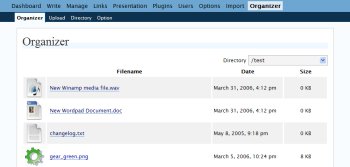
I finally managed to complete the Organizer which is compactable with wordpress 2.0.X
Changelog since last version.
- Fixed plugin to work with wordpress 2.0.x
- Complete rewrite and all files stays in plugin folder
- Plugin works with PHP 5
- Installation is simple
- Added directory functionality
- Added file upload functionality
- Added create, rename and delete directoy
- Added replace functionality to attachment in wordpress
- Added thumnail feature to image files
- Added file icons to other files
- Added roles capability to the plugin
- Fixed replace post file names with converting names to hmtlentities
- Fixed image resize with imagecopyresampled
- Fixed minor paging problem in class filelist
- Fixed minor bugs in function routines
Download Wordpress Organizer 1.0
Organizer supports roles. To fully utilize this feature please install worpress roler manager plugin.
70 Comments »
RSS feed for comments on this post. | TrackBack URI
I get this error when I activated this plugin.
Fatal error: Cannot redeclare is_valid_name() (previously declared in /home/rocky/domains/domain.com/public_html/wp-content/plugins/email/email.php:260) in /home/rocky/domains/domain.com/public_html/wp-content/plugins/organizer/plugin_functions.php on line 191
Comment by Rocky2889 — April 9, 2006 @ 9:15 pm
Have fixed the error by prefixing all the organizer plugin function with name organizer. So this solves the above issue.
Comment by Imthiaz — April 9, 2006 @ 11:35 pm
Thanks, is working now
Comment by Rocky2889 — April 10, 2006 @ 12:51 am
Hi, greetings from Melbourne Australia. Many thanks for the wonderful plugin!
We are using it as part of our physics blog for the International gravity wave detection experiments (LIGO). For which, being able to upload our notes, and other documents (pdf, ps, doc, etc.) is ‘bloody’ great.
Hopefully, this a quick question. I got the following error:
Fatal error: Call to undefined function: get_file_icon() in /data/www/sites/gravitywave/wp-content/plugins/organizer/page/index.php on line 53
when I tried listing a file folder directory that contains image files (.bmp) and documents. Any suggestions as to what I am doing wrong?
Thanks again, Steve
Comment by Steve Melnikoff — April 13, 2006 @ 7:23 am
Hi Steve Melnikoff
It was not your problem. It was my bad programming..
I have mad the update on the plugin. Now that problem is fixed. I hope you will not have any more issues.
Imthiaz
Comment by Imthiaz — April 13, 2006 @ 9:08 am
[...] Imthiaz Blog � Wordpress Plugin Organizer 1.0 画�管� (tags: plugin wordpress) tags: [...]
Pingback by : tokitamaweblog : » links for 2006-04-14 — April 14, 2006 @ 9:17 pm
Is is possible to implement the quota system to limit the total file size that user used?
Comment by ZT — April 15, 2006 @ 2:45 am
thanks for the plugin! very useful, but a quick note: you create directories in dir.php with 0666 permissions. this produces errors in your plugin because those directories aren’t accessible (no +x) by anyone. you probably wanted 755, 775, or 777. (i use 775 w/ group perms apache).
Comment by chris — April 16, 2006 @ 6:29 am
16-Apr-2006 - Version 1.1.0
- Added user level directory uploads
- Added user level extension
- Added user level upload limits
- Added user level upload quota
- Fixed directory permission bug
Comment by Imthiaz — April 16, 2006 @ 3:00 pm
Hi. I just installed it and almost everything seems to be working fine except the image list page… page=organizer/page/index.php&d=5
All of the thumbnails are broken. When I click on the text link of the file name the view page comes up fine. Any help?
Ken
Comment by ken — April 18, 2006 @ 7:08 pm
You know what would be really useful: somewhere on the detail page for a particular file, provide a full link that can be copied and pasted into the editing window for a post…
Comment by Chris L — April 19, 2006 @ 6:11 am
Sorry about my previous email… I was reading the instructions on the OLD version to add files to the wp-admin. Suggestion: change the files and directories to show “organizer1.0″, ditto the instruction page.
Well done!
Comment by Thomas Adkins — April 25, 2006 @ 7:24 am
“You know what would be really useful: somewhere on the detail page for a particular file, provide a full link that can be copied and pasted into the editing window for a post…”
I second this - didn’t the old Organizer used to do this? I’d love to see the next version with this facility, it’s way more important for novice users than you may think.
Anyhow, great plugin.
Comment by Jesse Pepperell — April 26, 2006 @ 7:35 pm
I have made the box. Now you can copy and paste the url of the file easily. I was thinking to do a lite file browser which I can snap to editor. In that case it will be very easy to upload and maintain files.
But very hard no time and I am on tight work.. :-D. But I will do it some day…
if any one interested can join me.
Comment by Imthiaz — April 26, 2006 @ 11:52 pm
Hi,
first of all, congratulations for the great plugin!
When viewing the details for an image I was getting the following error:
Image functions:
Fatal error: Call to undefined function: get_image_type() in D:\Program Files\Apache Group\Apache2\htdocs\wordpress201.dy\wp-content\plugins\organizer\page\view.php on line 314
In that line, replacing the call to “get_image_type” for a call to “organizer_get_image_type” seems to have solved it.
Cheers
Comment by Filipe Correia — May 17, 2006 @ 2:03 am
Just to say that “lite file browser” idea is getting better and better by the minute
For images it could insert the image automatically as an <img src=”…
and for other filetypes (ie, PDFs) it could make a direct link <a href=”…
Just some ideas if you come around to implement it…
Comment by Filipe Correia — May 18, 2006 @ 1:18 am
Brilliant plug-in. Just made my “indespensible” list of -must haves- for WP. Thanks so much for your contribution to the Word-Press Community.
Comment by kevin murray — June 2, 2006 @ 5:23 pm
Maybe I am doing something wrong…
But I´m getting this error.
Warning: main(plugin_functions.php): failed to open stream: No such file or directory in…etc…
Any idea of what might be causing an error message like that? The whole blog crashes until I delete the organizer folder.
Any help or clue would be really appreciated, guys.
MaX
Comment by MaX — June 5, 2006 @ 6:37 am
This might be an idea for a totally different plugin, but would it be possible to control user defined categories - outside of what setting I have in wordpress? Or maybe any directory?
Lets say my images uploaded through wordpress go to mysite.com/wp-content/images but I have other images uploaded through a different site/script/imagegallery/whatever that go to mysite.com/bla. The wordpress directory, to me, is already organized. The ones uploaded to /bla aren’t so much.
Is there a hack I can use? Would this be a security risk? Will this be in the next version?
Thanks
Comment by greg — June 7, 2006 @ 8:49 pm
It is working fine here, but the reference to the
gives a wrong reference, so the onchange() doesnt work.
I even dont have a /home/ dir.
So I have to call the dirs like
/wp-admin/admin.php?page=organizer/page/index.php&d=3
Any suggestions? All other JS calls are done by .. references.
Thanks for the nice plugin!
Comment by Merlinda — June 17, 2006 @ 2:46 am
sorry I cannot paste code here, I meant the reference to the general.js
Comment by Merlinda — June 17, 2006 @ 2:47 am
Hi,
i’m searching for an option that allows to resize uploaded pictures to a max px width. Is that possible with the Organizer Plugin?
Thx,
Emilino
Comment by Emilino — June 27, 2006 @ 5:09 pm
@Emilino:
currently its not possible to let the plugin resize pictures on the fly. But you can use for example Photopress_Plugin to do this job for you. I wouldn’t recommend the use of photopress for publishing images, as it doesn’t integrate into wordpress’s normal post and page-structure, but for resizing and watermarking images (or whole directories) its perfect. regards, erik
Comment by Erik — July 6, 2006 @ 8:43 pm
I like the plug-in, it’s nice.
I also need the capability to view and edit the “title” and “description” fields that are collected when I upload the files on the “upload” section of the Page editing page; is this something that you could add in a future version?
Thanks!
-Sara
Comment by Sara — July 20, 2006 @ 1:36 am
[...] [fixed] - GUI: “Wilkommen im bassheadz.org Adminbereich” -> Nicht mehr als 27 Zeichen für Newstitel verwenden, sonst schreibt Ihr außerhalb des gelben Balkens. -> Wenn Ihr hochauflösende Bilder in die News posten möchtet, dann bitte nicht mehr als 550 Pixel Breite. - Direktverlinkung auf die mail Adresse info@bassheadz.org: Spamschutz? - Logo in die url Leiste des Browsers. Steht unter Files zum download bereit - chCounter -Veröffentlicht von halbtuerke -> written by XXX Abgelegt unter Events -> saved in XXX Keine Kommentare » -> no comments -> booking auch verlinken - Crew: sollte auch wie das Newsarchiv aufklappen - Newsarchiv sollte aufgeklappt bleiben dass man zwischen den Kategorien springen kann. Beim erneuten click auf “news” klappt es wieder zu, oder man macht unten einen kleinen Pfeil der nach oben zeigt hin. - .haccess verlinken auf http://www.dnbsounds.com/files/basstunes_no_hotlink.jpg - Audio / Other & Files / Flyer: Textbox raus - Blogtitel aus dem Header via CSS löschen. Nicht aus den Einstellungen weil er sonst auch oben im Browser nicht angezeigt wird. - Crewseite für : “Mojo” - GUI: “Links” löschen - hotlinks (auf dem fileserver .htacceess) - in der Kommentaransicht verschiebt sich der blog Titel - unten sind 2 “beabeiten” buttons - booking: Textbox? - Aufklappfenster Crew: Mojo erscheint erst wenn man auf eine andere Crewseite clickt - Guestbook Maximal 10 Einträge pro Seite | Neue Einträge nach oben! - basstunes section mit cd cover & Clickcounter - [ALEX] eventplaner (Zusammenarbeit mit upcoming events und der Flyer section) - Slideshow Pro Director will nicht. Beim anlegen von Alben bleibt er stehen. (Firefox) - .htaccess nur auf mp3´s und jpg´s beziehen - basstunes: CD Covers können nicht gespeichert werden - “bearbeiten” button fehlt bei activities und dates - Gästebuch?? - zoomeffekt der verlinkten Bilder wie auf: http://www.panic.com/transmit/ - Schriftgröße im footer kleiner - Schriftfarbe heller - Suchfenster in die Sidebar unter news, ganz unten. Dazu folgendes Symbol: - muTunes plugin für die news installieren. http://www.thesmithsplace.com/mutunes/ oder http://www.stripytshirt.co.uk/features/wordpress/scrobblepress/wp-scrobblepress.zip- Hintergrund: - Newslettersystem: user tragen sich in einen Verteiler ein der automatsich die neuesten dates per mail verschickt. SOWAS?- organisator plugin zum verwalten des upload verzeichnisses: http://imthi.com/blog/77/index.php [...]
Pingback by Bassheadz » Archiv » 2 do — July 20, 2006 @ 12:48 pm
[...] Downloaded Organizer from http://imthi.com/blog/77/index.php [...]
Pingback by Me, Myself, and Me » Blog Archive » Plugin: Organizer — August 3, 2006 @ 3:50 am
Hi!
I installed “Organizer” and configured the Role Manger plugin for “Organizer” - everything is green. When I log into the Wordpress Admin Control Center with an admin account and go to “Organizer” into a folder and klick on a link of a file (example: .pdf). I always get this: “Du hast nicht ausreichend Rechte, um auf diese Seite zuzugreifen.” - So I do not have the rights to access this file ;( So, what does I have to do? Please help me. Thx Michael
Comment by Michael — August 7, 2006 @ 5:04 pm
There is an issue with wordpress 2.0.4 I will work and give a fix soon
Comment by Imthiaz — August 7, 2006 @ 5:10 pm
WordPress Plugin : Organizer…
åŠæœˆè¨˜ » Organizerプラグインã§ç´¹ä»‹ã•れãŸãƒ—ラグインã§ã™ãŒã€é¢ç™½ãã†ãªãƒ—ラグインãªã®ã§ã€ã†ã¡ã®ã‚µã‚¤ãƒˆã§ã‚‚使ã†ã“ã¨ã«ã—ã¦ã¿ã¾ã—ãŸã€‚ã¡ãªã¿ã«æ—¥æœ¬èªžåŒ–も・・・
……
Trackback by orioa — August 7, 2006 @ 5:21 pm
[...] Organizer Plugin-Seite | Download Fügt dem Admin-Menü im Backend einen neuen Eintrag “Organizer” hinzu, mit dem sich recht einfach der Upload-Ordner verwalten lässt. Sehr nützlich, besonders wenn der Ordner irgendwann mal unübersichtlich wird WP Admin Bar 2 Plugin-Seite | Download Sehr chices Plugin. Sobald man als Admin oder User im Blog angemeldet ist, erscheint im Live-Modus des Blogs oben die Admin Bar. In ihr findet sich das Backend-Menü, so dass man ganz einfach hin- und hernavigieren kann. Auch zum Abmelden muss man nicht erst den “Meta”-Eintrag in der Sidebar suchen. [...]
Pingback by Thoughtcatcher » Blog Archive » Neue Wordpress-Plugins im Blog — August 8, 2006 @ 11:57 pm
I have fixed the issue with wp 2.0.4 it was an issue while adding the plugin pages.
Thanks Guys
and sorry for the delay
Comment by Imthiaz — August 16, 2006 @ 6:53 am
Hi! Thanks for this plugin and your recent fix for wp 2.0.4!!!
I have the same question as greg: it’s possible to define a specific folder that users can view? I’d like that they only see and upload to the folder /uploads..
The “title†and “description†fields also would be great…
thks!!
Rafael
Comment by Rafael — August 16, 2006 @ 4:42 pm
Imthiaz:
Nice work! Thanks.
Wishlist:
Resize to a pixel height or width - so you can make thumbnails exactly the same size from different size originals.
Don’t underline text in the Organizer unless it really is a link. Use bold text instead.
Comment by Theo — August 23, 2006 @ 8:11 am
also:
Please started using revision numbers in your file names - so we know if we have the latest version.
Comment by Theo — August 23, 2006 @ 8:12 am
When I try to update anything (user setting, organizer options) I get an Internal Server Error. Some other things work (directory maintenance, for example) but updates aren’t working.
Thanks.
Comment by dpayton — August 30, 2006 @ 12:09 am
[...] Imthiaz Rafiq (Organizer) [...]
Pingback by blog.detlog.org » Archive » WordPress Standard Guidebook — October 8, 2006 @ 7:47 am
It’s “compatible”, not “compactable”.
Comment by Mu — October 24, 2006 @ 1:02 pm
Hello,
Just wondering if anyone could help. I did something stupid and started my blog using a numerical archive system, and now I'd like to change it so that the post title is part of the URL for SEO reasons. Is there any Wordpress plugins that anyone knows of that could switch it without sending Googlers to invalid pages? Maybe some sort of redirector to the correct page?
Thanks.
Comment by Ezekiel — October 31, 2006 @ 1:59 pm
Thanks from Galicia in Spain. I’m nice with your plugin.
Comment by kardavi — November 9, 2006 @ 2:56 pm
Hi,
after install Organize, when I go to Organizer–> Organizer I get this error:
Warning: opendir(C:/Program Files/xampp/htdocs/wordp205/wp-content/uploads/) [function.opendir]: failed to open dir: Invalid argument in C:\Program Files\xampp\htdocs\wordp205\wp-content\plugins\organizer\class_filereader.php on line 23
When I go to Organizer–>Upload, I get the following errors:
Warning: opendir(C:/Program Files/xampp/htdocs/wordp205/wp-content/uploads) [function.opendir]: failed to open dir: Invalid argument in C:\Program Files\xampp\htdocs\wordp205\wp-content\plugins\organizer\plugin_functions.php on line 174
Warning: opendir(C:/Program Files/xampp/htdocs/wordp205/wp-content/uploads) [function.opendir]: failed to open dir: Invalid argument in C:\Program Files\xampp\htdocs\wordp205\wp-content\plugins\organizer\plugin_functions.php on line 295
Warning: readdir(): supplied argument is not a valid Directory resource in C:\Program Files\xampp\htdocs\wordp205\wp-content\plugins\organizer\plugin_functions.php on line 296
Warning: closedir(): supplied argument is not a valid Directory resource in C:\Program Files\xampp\htdocs\wordp205\wp-content\plugins\organizer\plugin_functions.php on line 301
Thank you for your help.
Comment by Germán — November 17, 2006 @ 7:33 pm
hello,
I have this problem..
Warning: opendir(/www/htdocs/rolo/blog/wp-content/uploads): failed to open dir: No such file or directory in /www/htdocs/rolo/blog/wp-content/plugins/organizer/plugin_functions.php on line 174
Warning: opendir(/www/htdocs/rolo/blog/wp-content/uploads/): failed to open dir: No such file or directory in /www/htdocs/rolo/blog/wp-content/plugins/organizer/class_filereader.php on line 23
Do you know how I can fix it?
Thanks,
Chrissy
Comment by Chrissy — November 23, 2006 @ 12:33 am
hi!
after uploading and activating the plugin i got following message:
Warning: opendir(/www/htdocs/*myLogin*/wp-content/uploads) [function.opendir]: failed to open dir: No such file or directory in /www/htdocs/*myLogin*/wp-content/plugins/organizer/plugin_functions.php on line 174
is it, because have instead of a folder …/wp-content/upload the folder …/wp-content/up ?
thanks for answering,
dave
Comment by Dave — December 5, 2006 @ 8:16 pm
What I want to do on my blog, is every few hours take the oldest post and move it to the
front of the queue, all automatically. Anyone know if there is a plugin that can do this or
a simple way to set up another plugin to do this (use my own feed perhaps)?
Thanks.
Comment by Brayan — December 13, 2006 @ 1:10 am
Hi, I installed your plugin, but as I switch the directory dropdown I get a javascript error on organizer_jump_directory not defined, although general.js is included in the page…
Am I doing anything wrong??
Thanks in advance. Theo
Comment by Theo Bakker — December 16, 2006 @ 10:24 pm
Hy, i have Wordpress 2.05 installed but the organizer plugin not rules.
At principal page of plugin (page=organizer/page/index.php) the select menu option “onchange” is death. I can see the list of directorys of my site, but the page not change when i select any directory. I tyr at the last Firefox and in Explorer 5.
Can you do the menu option with the SUBMIT button? why not rules my organizer?
Sorry for my english. I´m spanish blogger.
Thanks
Comment by sekano — December 24, 2006 @ 9:19 am
This is great work, I have been looking for a simple plugin to resize images, and now I have one, thanks for putting in the time to code this for the WP community!
I dont have image magic on the server, just the GD graphics library for image manipulation - possibly this is causing the following issues:
- Thumbnails dont appear in list view, just the word ‘thumbnail’
- Image doesn’t appear in resize page, just a small grey box with the text ‘image’
These arent big issues, but no thumbnails in list view is a bit annoying.
The major issue I have is that images uploaded through Organiser are not visible when you are in the write page view - this is a big problem obviously! I have checked that the upload path is right and that ’sort uploads by month/date’ is turned off to keep things simple - but no luck!
Comment by Ninjaboy — January 9, 2007 @ 9:18 pm
Hi,
Seems to be great plugin.
Cannot change directory though, In FF nothing happens and in IE 5, I’ve got js error.
I’m running WP 2.1
Any idea?
Comment by thomaz — February 21, 2007 @ 3:30 pm
Hi,
i used the Organizer in the past and think its a great tool. Since the inclusion of the Capability-stuff, nothing works anymore, though. Even though my administrator role has all the Organizer permissions, I always get error messages when I try to click an image.
I beg you, please take that out again. I don’t think there’s really any good use for such fine-grained control, it just creates hassle and dependency on the (broken) Role-Manager Plugin. I’d love to see this working again.
Comment by Jan — February 28, 2007 @ 1:47 pm
Please consider adding the extensions for OpenOffice.org
Comment by Robert — April 9, 2007 @ 7:18 pm
NEWBIE ALERT
I have it installed & activated according to directions provided in the README file.
It shows up in Dashboard.
I cannot find a directory to view files.
I cannot create a directory.
Only directory that is listed in dropdown menu is “/”
I’m sure I am missing somethign incredibly simple and obvious to the rest of you…Help??
Comment by JMM — April 14, 2007 @ 12:33 am
I’ve a suggestion.
If I want to upload for example 30 images it’s boring to do it 1 by 1, maybe it exists something that allows you tu upload a file (ZIP) and then uncompress it on the folder.
Myebe someone have done it ?
Comment by Roger — April 27, 2007 @ 6:16 pm
Hi,
I was wondering if it was possible to make Organizer work with directories outside Wordpress?
I would like to use an other dir on my server.
Kind regards,
Raf Goetschalckx
Comment by Raf — May 16, 2007 @ 9:03 pm
Great Plugin.
Your “rewrite” function that occurs when renaming an uploaded file in all the posts doesn’t seem to catch the title atributes in links for me.
Thanks again.
Comment by Taylor — June 27, 2007 @ 12:14 pm
Hi guys!
Do you know any solution to manage uploads for post images?
This plugin is good, but I still cannot insert inline from the filebrowser..
I thought what I upload here the same folder/file structure will be available in the imagebrowser of the post write panel..
Any ideas?
Thx in advance..
Comment by FigurArt — July 25, 2007 @ 9:31 pm
Hello,
I’ve uploaded the organizer plugin.
It seems to be working okay, however when I go to the organizer pannel in the admin page, and choose view files or organizer, it says there are no files in the directory.
I know that it’s uploading the files correctly, becuase I checked my server. It just doesn’t show them.
Please let me know why the images are not showing up.
Comment by Akram — July 30, 2007 @ 8:17 pm
@sekano, @thomaz, and anyone else who can’t get the directory to change on index.php and view.php:
I copied and pasted the javascript from general.js into the top of both pages, and it works. Not sure why the javascript include isn’t working, but I put this at the top of both index.php and view.php:
Safari and Firefox on OS X 10.4. Not tested on Windows, where I assume the default installation works…
Comment by Paul — August 25, 2007 @ 8:39 pm
Sorry, guess the code was stripped out. It’s just the typical script tag with language=”javascript” followed by the code in general.js and a close script tag.
Comment by Paul — August 25, 2007 @ 8:52 pm
Thanks that worked great!
Comment by Akram — August 31, 2007 @ 12:52 am
If anyone is interested I was also having the CSS and JS not found issues and the drop down menu wouldn’t work so I made this change to file “plugin_functions.jsp” on line 69.
————————————————–
function organizer_add_files_to_admin_head(){
print(”);
print(”);
}
—————————————————
This puts in the proper path for your server based on the website URL not on the document server root path that the browser doesn’t understand.
Comment by sergio — September 10, 2007 @ 9:32 am
Sorry, pasting the code didn’t work. Let me try again.
function organizer_add_files_to_admin_head(){
print('');
print('');
}
Comment by sergio — September 10, 2007 @ 9:33 am
function organizer_add_files_to_admin_head(){
print(’<link rel=”stylesheet” type=”text/css” href=”‘);
bloginfo(’wpurl’);
print(’/wp-content/plugins/organizer/general.css” type=”text/css” />’);
print(’<script type=”text/javascript” src=”‘);
bloginfo(’wpurl’);
print(’/wp-content/plugins/organizer/general.js”></script>’);
}
Comment by sergio — September 10, 2007 @ 9:38 am
you ROCK!!!!!
awsome plugin
Comment by simon — October 5, 2007 @ 4:15 pm
Although I set the ‘Upload folder’ to ‘user specific’, the files are uploaded to the default location. (Organizer 1.2.1 with WP 2.1.2)
I wished, every user had an own upload folder, where his files are stored. Does this work in general?
Comment by Lu — October 6, 2007 @ 2:52 am
I’m also having problems getting the drop down to work. I tried the recommendations above but still nothing. Any Ideas?
Comment by Dave — October 9, 2007 @ 2:11 am
Tank you it works fine in WP 2.3
Comment by Omegacool — October 10, 2007 @ 3:44 am
Nice plugin, it seems this is what I was looking for. Can you help me in these questions, please?
1. Do you have a page with the explanation of the roles?
2. Whislist: is it possible to have a default setting? This is what I mean: in the Users tab you would be able to set the default settings for every user. The per-user settings (that you have now) would overwrite it. This way I wouldn’t need to add hundreds of users one by one.
Gavriel
Comment by Gavriel — October 28, 2007 @ 3:34 am
been trying to integrate it into Write Posts, though this is VERY makeshift, rough and breaks a lot of rules in WP. Just as an experiment really, but here is the readme I am creating for myself. There are changes to CORE and PLUGIN files: http://culturalshifts.com/ChangesForOrganizer.txt
Comment by eliot — November 2, 2007 @ 7:03 pm
Hi,
Installed this on my site but have the same problems as JMM april 14th 2007.
I really want users to have their own folders, so that they can find their images easily using image manager.
When images are uploaded, with the organizer active they still go to the default blog folder.
The idea is sweet. Maybe it’s my config. I REALLY want this to work!
Mark
Comment by Mark — November 23, 2007 @ 3:54 pm
I love the idea of this plugin, it would allow me to not have to use “Imagemanager” anymore. That plugin is slow and buggy.
I do wish I was able to upload images into a specific directory right from the post screen though, as opposed to having to go to another tab in the admin screen.
Is this a feature you plan on adding to the plugin? Im sure im not the only one who would love it. It would speed up the whole process of posting in wordpress.
Comment by Josh — January 24, 2008 @ 5:16 am
Great plugin, great idea.
bookmarked.
Comment by Scarlet — May 8, 2008 @ 7:37 pm