All posts

iPhone RSS Reader Application with source code
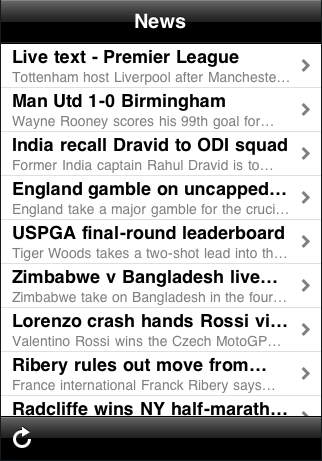
I am really happy to release my first iPhone application source. This is a simple RSS reader application and it loads the latest news from BBC.

While doing this application I got to learn and to get a rough idea bout the following

  • How basic iPhone application works
  • View & view controllers
  • Tableviews, Tableview Datasource & Tableview Delegate
  • Navigation controller
  • Threading
  • XML parser etc

.
To make this application I have broken my head reading lot of samples and watching video tutorials. I am very sure the application will have lot of issues and mistakes. If anyone feels so please give me a comment So I have a chance to correct myself. So far I find it really interesting and challenging :-)

Application Main View : This view loads the RSS parser as a thread, this will download the RSS and parse it. Once the thread is completed it loads the RSS item into a UITableView.
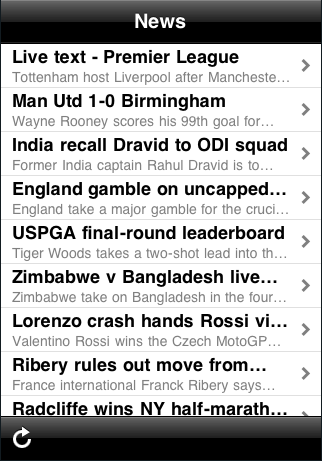
Rss Reader Main View

News detail View : Based on what news is selected it loads the detailed news view.
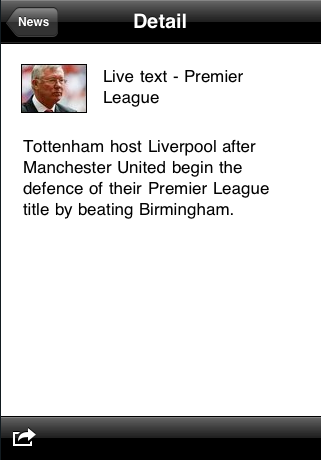
Rss Reader Detail View

Alert View: Gives you a choice if you want to open the RSS item in safari browser.
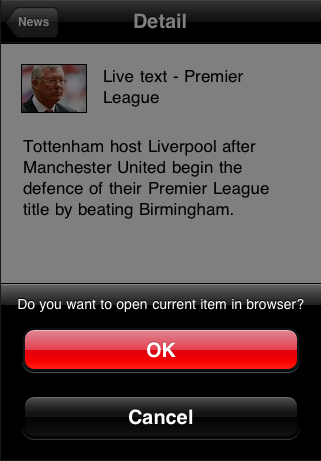
Rss Reader Open Link View

Please forgive me for not putting the complete explanation about the application. I am sure it is pretty simple to figure it out.

Download iPhone RSS Reader Application Source Code

Category
Tags

Discussion

70 comments

  1. Sunil
    congrats brother.. looks good :)
  2. ash
    Great stuff !! You could have added a little document as well explaining step by step procedure...
  3. Craig Lockwood
    Excellent stuff! It would be great if the refresh button was on the top nav bar, that would free up the bottom to have a tab bar. The RRS reader could then be incorporated into other apps.
  4. Neil
    In which file should i change the RSS url ? As i want to play and learn Compact C with this great source code :) thank you.
    ImthiazAuthor
    Hi Neil , Check Classes/BlogRssParser.m change the bellow lines to whatever RSS url you want to
    objective-c
    NSURL *url = [NSURL URLWithString:@"http://newsrss.bbc.co.uk/rss/sportonline_world_edition/front_page/rss.xml"];
  5. David
    Hey Imthiaz First thanks for the code mate it is awesome, I have used you example to add a blog reader functionality to my tab based application I have got it all working but just having problems with getting the loadNewsDetail to work, in the RSSFunViewController.h Nothing happens on table cell click... Anyway help would be great...
    ImthiazAuthor
    Hi David I am loading an image from the internet when the view is loading. I am using the main application thread to download it. So the application is stops tills the data is download (Which is really bad way of doing it sorry about that). You can comment these lines in NewsDetailViewController.m
    objective-c
        /*
        NSString * mediaUrl = [[[self appDelegate]currentlySelectedBlogItem]mediaUrl];
    
    .....
    
            [UIApplication sharedApplication].networkActivityIndicatorVisible = NO;
        }
         */
    Hope this helps
    Abhra
    Hey Imthiaz, I am new to iphone but have very good interest on that... i show your code but not able to make it run.. Can you please guide me how to run this code?? what environment i need to run it?? i am not seeing any "make file" kind of staff to compile this code... how can compile it?? thanks in advance..
    ImthiazAuthor
    You need to use Xcode with iPhone SDK to compile code. Xcode is available only in mac platform.
    caglaro
    I have the exact same problem, did you find a way to solve it? Can you please share the steps? Thanks
    Abhra
    Thanks Imthiaz! Can we get any opensource/free simulator on windows or Linux to develop IPhone application?? I like to do some R&D on iphone application development. If yes can you please provide me the link or name of the tool kit thanks in advance!
    Digiguy
    Hi David, Firstly, wow and great work Imathiaz!!! super work!! looks great! We all need more people like you contributing to the code base to really keep the iphone development moving forward quickly! Could you tell me the steps of how you imported this into your project? Or have you found a good online tutorial on how to import a xcode project into an xcode project? I haven't found one... If you had a link I would really really appreciate it. Did you just import all the h, m, and xib files, then; rename the main.xib to say rss.xib create navigation control( thinking of an IBAction to launch it or from a segment) how did you deal with the appDelegate? Renaming all references in the code, importing it all into the existing appDelegate seems really tedious and not really necessary.. in a fundamental way yes, but nothing is a perfect world... Are there any preferences for each individual h, m, and xib files that need to be changed on import? before or after? Thanks for any info and knowledge you can share? Anyone out there know a general reference for doing this? Anyone want to work on it with me? But I am sure it is not so difficult, I just want to make sure I start on the right path, not a dead end one. Thanks for any help anyone can shed on this!!! Sincerely, Kirk digiguy1ATAThotmail.com
  6. David
    Hey Imthiaz Wow quick reply, wasn't able to get this to work. But was able to switch views by setting up a new view controller. I am going to package and post a URL to zip here so others can play with the code I have mashed together. My second question is, has anyone go experience with CDATA in rss2 feeds. Now I noticed in the BlogRssParser.m their is a reference to forceCDATA.
    objective-c
    - (void)parser:(NSXMLParser *)parser foundCDATA:(NSData *)CDATABlock{
    	//Not needed for now
    }
    How do we go about implementing this.... Will post what I have for others later tonight Australia time.
    ImthiazAuthor
    Hi David I am using this way. This will get called multiple times so you have to store it in local variable
    objective-c
    - (void)parser:(NSXMLParser *)parser foundCDATA:(NSData *)CDATABlock{
     NSString* cdataString = [[NSString alloc] initWithData:CDATABlock encoding:NSUTF8StringEncoding];
     //Do you magic !!!
     [cdataString release];
    }
    Hope this helps :-)
    Martin
    objective-c
    - (void)parser:(NSXMLParser *)parser foundCDATA:(NSData *)CDATABlock{
    	NSString* cdataString = [[NSString alloc] initWithData:CDATABlock encoding:NSUTF8StringEncoding];
    	if(nil != self.currentItemValue){
    		[self.currentItemValue appendString:cdataString];
    	}
    	[cdataString release];
    }
    Craig
    Works much better - but Still getting some HTML tags. Particularly on this feed: http://www.dad.info/rss/news.xml Any help greatly appreciatted craiglockwood@me.com
  7. jason
    Thanks a whole bunch for this! I'm trying to figure out how to add in the pubDate data using a text field. However, being the noob I am, I can't seem to figure out to get the DetailController to let it be viewable. Thanks!
  8. caglaro
    Hello Everyone, Is there any easy way to add a uitabbar & uinavigationcontroller to this application? I want to keep the logic exactly as it is however, I want the first page to show the xml list but just be built on top of a uinavigation & uitabbar. Any help will be greatly appreciated, I have been struggling with this for more than 3 days now :( Thanks alot in advance.
  9. Rob Green
    Thank you so much for sharing your code. I was wanting an RSS reader that could also store data in the event that there was no internet connection available. Instead of using NSURL *url = [NSURLWithString:@"http:xxxxx"]; I am using: NSData *data = [NSData dataWithContentsOfURL:[NSURLWithString:@"http:xxxxx"]] This way I can save it and retrieve it using NSKeyedArchiver.
    ImthiazAuthor
    Yeah it is possible. For my projects I have done a extended class for Urlconnection and handling caching techniques there.
  10. Bill
    Nice work! I was just wondering how to get the my description to appear. it appears as the following in my feeds. <![CDATA[ SUNNYVALE, Calif., October 19th, 2009 Thanks again for this sweet code!
  11. Rene
    Thanks for this tutorial. But I cannot implement my RSS Feed :-( When I change the Blog URL I see in the tableView and I can select it. But then I only see the title and the UITextView is empty. Why is it so? I have an wordpress blog. I found out if I replace my URL with the Feed URL from this site that it it will be the same issue. Can anyone help me?
  12. Chris
    Wow awesome app and thank you so much for showing us the sources code, being a newbie I just had a couple of question, if I may first is there anyway, when you click the read more button that instead of it opening in safari it will open the web page with in the app, and is it possible to add e-mail functionality to the app via a button. Once again thank you so much for providing this to us and thank you in advance for any help in sorting out the two above questions Chris
  13. Gary
    I have a problem with the formatting of the rss feed. All the sentences run together. Where do you eliminate the spaces, line breaks, etc?
  14. Digiguy
    Hi, Anyone out there know how to parse the information being received from feedburner? Straight text is fine, but html code is being included in the detail view, like hyperlink code, bolding, etc, or embedded links. Options possible I think 1. parse it for anything between a "" ? this would eliminate all links, but at least the simple text feed would be there. 2. Interpret these in the detail view as what they are in html code? Maybe just the way it is displayed is the problem. 3. Obvious answer, just don´t do a feed with a link or embedded html. Alternatively, I wouldn`t mind just setting up a rss feed on a host that doesn´t have this issue... Anyone know of a host that works ok for this using this code? Thanks again for anyone that can help with a bit of code on this. I will work on it, and repost for results... Thanks !!
  15. piggio
    Hello! Thank you for this wonderful code! The app is working, but viewing of feed is not so good... The Article Title it's ok, but the first words containts a If an Article is selected, next page Image frame has a "?" (unknown.png I think), while the text contains first many <a href... and then the real text of the rss... Hope you may help... TNX!
  16. mitchell
    Hello, I was wondering if I can get some help???? I replaced the url with: http://techtrackr.com/feed/ , and now it doesn't show the text of the posts but only the titles. No images either. Can somebody please help me!??!?!?!?!?!?!!? Thanks for the code by the way! IT ROCKS!!!!!!!! Mitchell
  17. Arturo Texada
    Hi, I have used the code and I have tried several URL's these are the results I got...
    objective-c
    1.-	NSURL *url = [NSURL URLWithString:@"http://newsrss.bbc.co.uk/rss/sportonline_world_edition/front_page/rss.xml"];	// Excellent maybe the image greater like 84 X 84
    2.-	NSURL *url = [NSURL URLWithString:@"http://community.woodwing.net/rss.xml"];										// No images, table filled with enough text but grab a lot of html-trash into the display
    3.-  NSURL *url = [NSURL URLWithString:@"http://ax.phobos.apple.com.edgesuite.net/WebObjects/MZStore.woa/wpa/MRSS/newreleases/limit=300/rss.xml"];  // Repeat the same information from Title on Description.
    4.-	NSURL *url = [NSURL URLWithString:@"http://earthquake.usgs.gov/eqcenter/catalogs/7day-M2.5.xml"];					// Doesn't work at all
    5.-  NSURL *url = [NSURL URLWithString:@"http://feeds.feedburner.com/TheAppleBlog"];										// Reads only the title...
    6.-  NSURL *url = [NSURL URLWithString:@"http://dblog.com.au/feed/"];													// No images, table filled with enough text but grab a lot of html-trash into the display
    7.-  NSURL *url = [NSURL URLWithString:@"http://www.nrg.co.il/online/RSS/1.xml"];  Says no Internet connection, even when there is fine connection. Text in Hebrew, territory constraints?
    I REALLY appreciate your CODE
    Arturo Texada
    Hi... It seems that the description element is forbidden to be accessed... it has a ![CDATA[ ...]] parameter. Do somebody could share a hint about... how to use strings manipulation to avoid this parameter? Really appreciate any help...
  18. Bernd
    Hi, very good piece of work! Would you agree, if we modify this script sligthly and offer it free of charge to the users of our network? At least the RSS-URL has to been changed for this purpose :-) Thanks, Bernd
  19. joviberton
    hi thank you for sharing the code. i ve just installed SDK and i was lookin for something to make my first steps into iphone app. i ve changed something in the the view even if i ve not understood yet how things get connected. may you add some links of usefull tutorials you saw? anyway really thank you cheers from italy
  20. Joseph Phan
    Hey Imthiaz, thanks for the code....it saved me a lot of time!! I was able to modify it with no problem, but I'm a newbie to iPhone coding and have a question about your syntax: In the header files, why do you need to declare underscore-prefixed pointers in @interface, and create properties without the underscore, then in the implementation files you synthesize the property and assign it to the underscore-prefixed pointers? Couldn't you use the same variable name (without underscore) for @interface, @property, and @synthesize?
  21. Fuji
    Great code, it works very well, Could you give me a tip on how to add multiple RSS feeds? (url1, url2 ... urln) Thanks in advance
  22. SomniusX
    I think i can love you after you made this.. i've been searching for like 1,5 year now.. Thank mate!
  23. J Briant
    May I ask what license you are releasing this under, or are you placing it in the public domain? Thanks, Jamie
    ImthiazAuthor
    @Briant It is free to use and there is no license :-)
    J Briant
    Thanks mate. You've just saved someone a lot of trouble :-)
  24. jrusi
    Thank´s for sharing the code. I´ve noticed that it doesn´t show body of the bost when using rss2. Any suggestions on how to fix it? Thanks :)
  25. jeanphilippe
    HI Imthiaz, Thanks for sharing, it's very appreciated ! What's the trip to use rss feed containing html ? Because when i test with : http://www.svmmac.fr/apple/news/rss/feed, i see the html balises in the display. Can you help us ? Thanks a lot JP
  26. jeanphilippe
    Hi, How to change the font size in UITableView News ? Thanks JP
  27. Adam
    Hi Imthiaz, Thanks for the making this code public. It's been extremely helpful! Like some others, I was wondering if you had any advice for making this work with a Tab Bar Controller, The RSS view loads the feeds perfectly but nothing happens on table click. I guess it might be related delegate? Any advice you could offer would be fantastic. Thanks.
  28. prateek
    really a great work ... imthiaz... hands of to u... u really masters in this field. please give me some tutotials of this applications if u have . that will be so nice of u .
  29. Nick
    Hi, Excellent code!! This is a great rss reader. Can you tell me how I can edit the NavigationController and also change the text for "News" and "Detail" heading? Thanks, Nick
    Prabhakar
    Try http://tritoneapps.com iphone games source codes, really amazing and very less price only $5, more details contact prabhakar@tritonetech.com
    Iris
    Yeah, have you figured that out? I have no clue where I can change it!!!!
    Smith
    I bought source code from http://tritoneapps.com, its really nice and worthy, just i include my graphics and uploaded in itunes store, still earning more money from last 20 days, thanks for this post.. Chers, Smith
    Joey
    it is located in he inspector tab
  30. SmirnoffRyo
    Can you provide me with a tutorial on how to recreate this. Especially on how to create the news detail controller. I'd greatly appreciate it.
  31. ius-student
    Good stuff. Impressive.
  32. David101
    Thanks for sharing the code...I was looking for source codes to start developing Iphone games Just came across some sites like www.tritoneapps.com,www.codebeach.com where more than source codes are available for more than 40 games enjoy!!
  33. koder
    Any idea on how I could remove the html tags that show up in the feed? Great code btw, really impressive! Thank you.
  34. adam
    many thanks for this source. one question, i noticed you are saving the "pubDate" of the post but you are not calling it in the NewsDetailViewController. I've tried calling it myself like so:
    objective-c
    self.pubDateTextView.text = [[[self appDelegate] currentlySelectedBlogItem]pubDate];
    and i set that output to a new textView but when i run it it shows up as (null). any help? how can i call the pubDate to have it show correctly?
  35. Chris H
    Great!!! This is almost exactly what I was looking for! I've started to develop my own apps, and this is excellent code to study! Brilliant work!
  36. marco
    Hi, can you tell me how to insert a thumb image in the list and image in detail view? I wish to insert a 4 rss with 4 tab: it's possibile true? thanks
  37. marco
    detail.. ok, sorry
  38. Niyaz
    Wonderful article for Navigation and Tab Bar control with XML file to read and display into table view. Please keep continue to put good code related iPhone requirement. Thanks a lot Niyaz Ahmad
  39. Ratio
    You are a lifesaver!! Thanks for posting this code. Is there a way to get a thumbnail into the UITableView?
  40. Kyle
    Hi thanks much for the coding work its a great example to work with.. I had a question about it though. When using an rss feed from somewhere such as twitter the parser seems to just pull every item in the feed. This can be bad for me when its putting up 20 items+. How would I get it to just pull the ten newest items or at least limit the NSMutablearray that it is adding currentitems to "10". Any help in limiting the number would be great! thanks again for the good work.
  41. Scarlett Morgan
    RSS Feeds are really very helpful and you could get site and news updates from it.;-`
  42. Noob2
    This is a great reader. Like several other interested posters, can you add a thumbnail image to the detail view? And also, how do you change the navigation bar? Thank you!
  43. Mark
    Thanks for this. It's a good foundation.
  44. Preeti
    This application does not work properly on my connection.The feeds dont get loaded.While if I try the feeds which dont have xml style sheets.Those are working fine.Is this an internet connection problem??? Need Help!!!!
    Accilies
    Should be as it works fine at my end.
  45. ava
    Great work! Would really love to know how to add a thumbnail image from the feed to the table view I would be sooo happy if somebody can help me!! Thanks
  46. Accilies
    Excellent work. Just started with iPhone app development, this give a very clear idea on use of classes and delegates. Amazing work and very helpful of you to release the source code. Thanks once again.
  47. Daniel
    dude, tnx a lot, great app to learn from, keep up the good work.
  48. Cinthya
    Thank you for this tutorial is very useful, but I have a problem I want to add to the cell the title, date and image of the Post de la web, I tried UITAbleViewCell and some forms of schedule but not run, could you help me please?