For me it took sometime to figure out how to show activity indicator in the navigation bar. Later I found it was very simple. When you push a view to the navigation you get to play with navigationItem property on the view that is being pushed. In your viewWillAppear method you can add this code.
-(void)viewWillAppear:(BOOL)animated{
	[super viewWillAppear:YES];
	//Create an instance of activity indicator view
	UIActivityIndicatorView * activityIndicator = [[UIActivityIndicatorView alloc] initWithFrame:CGRectMake(0, 0, 20, 20)];
	//set the initial property
	[activityIndicator stopAnimating];
	[activityIndicator hidesWhenStopped];
	//Create an instance of Bar button item with custome view which is of activity indicator
	UIBarButtonItem * barButton = [[UIBarButtonItem alloc] initWithCustomView:activityIndicator];
	//Set the bar button the navigation bar
	[self navigationItem].rightBarButtonItem = barButton;
	//Memory clean up
	[activityIndicator release];
	[barButton release];
}
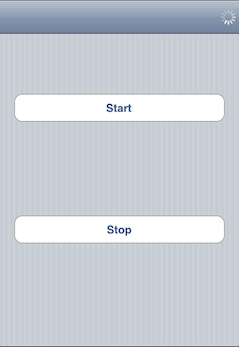
I have done a sample application demonstrating this code. It is based on iPhone navigation project template. In the application I have two action to start and stop the animation.
-(IBAction)startActivity:(id)sender{
	//Send startAnimating message to the view
	[(UIActivityIndicatorView *)[self navigationItem].rightBarButtonItem.customView startAnimating];
}

-(IBAction)stopActivity:(id)sender{
	//Send stopAnimating message to the view
	[(UIActivityIndicatorView *)[self navigationItem].rightBarButtonItem.customView stopAnimating];
}
Screen shot of the application
Download Load Activity Indicator Xcode project files.
this is great, just what i was looking for but where do i insert the code?
How would I START the animation before I “visit the web to get some data” and then STOP the animation after the data is received?
“Demo code is great”… but “real world use examples” are even better.
(There aren’t too many people that just need 2 buttons to manually start/stop the animation.)
Thanks for the short tut